sloth
A personal web app that detects whatever you're listening to on Spotify and transforms it into something slower, deeper, and more ethereal. On demand. No searching required.
It turns any track into something dreamier and more emotional. Like you're hearing it for the first time all over again.
The problem
The hassle crept up slowly. A song would come up in my Spotify shuffle and I'd want to hear it slowed, so I had to stop what I was doing, go to YouTube, and search for a version someone had already uploaded. There were always multiple results. I'd listen to each one to figure out which sounded closest to what I wanted. Half the time the song was way too slow, or didn't have enough reverb, or the version I wanted just didn't exist.
I knew I could build something for myself that solved this. The exact version I wanted, of any song I was already listening to, right now, tuned exactly the way I like it.
Ideation
Before I touched anything, I thought through what this app actually needed to do. Not a full feature list, just the non-negotiables. A speed slider. A reverb slider. And the ability to detect whatever song I was playing on Spotify and have the app load it up ready to go. That was the core. Everything else could come later.
I built a quick first prototype using Claude Code. Within a surprisingly short time I had something running on my phone that I could actually play with. A song I'd been wanting to hear this way was now right there in front of me, and I could slow it down and add reverb in real time. That moment completely hooked me.
From there I jumped into Figma and started thinking about what this app could look like. I wanted it to feel intentional. Not just a functional tool but something with real personality. The kind of thing you enjoy opening.
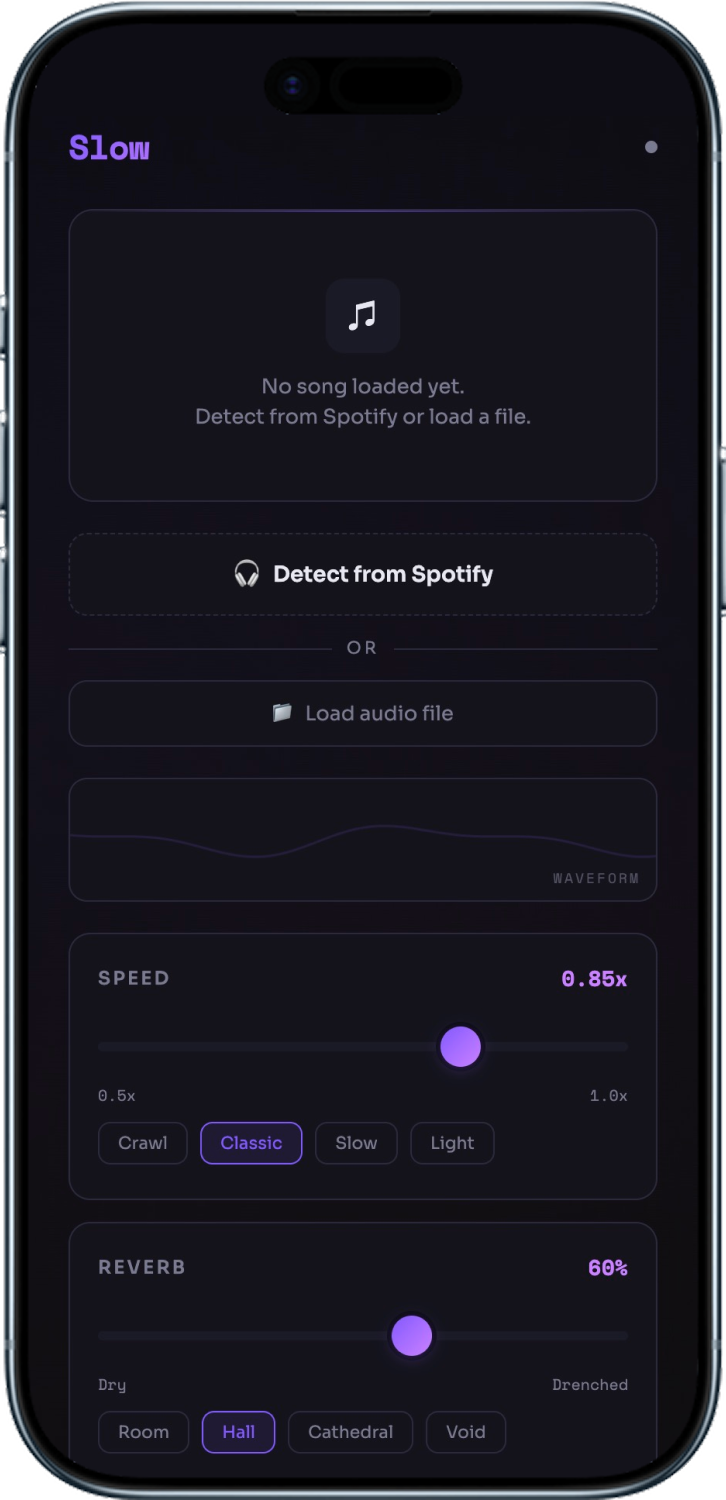
This is what Claude Code produced from the very first build. Dark theme, purple accents, working name “SlowVerb.” It wasn't pretty but it worked. Spotify detection, audio playback, speed and reverb sliders. Actually using it for the first time and hearing a slowed version of a song I picked was the moment I knew I had to keep going.
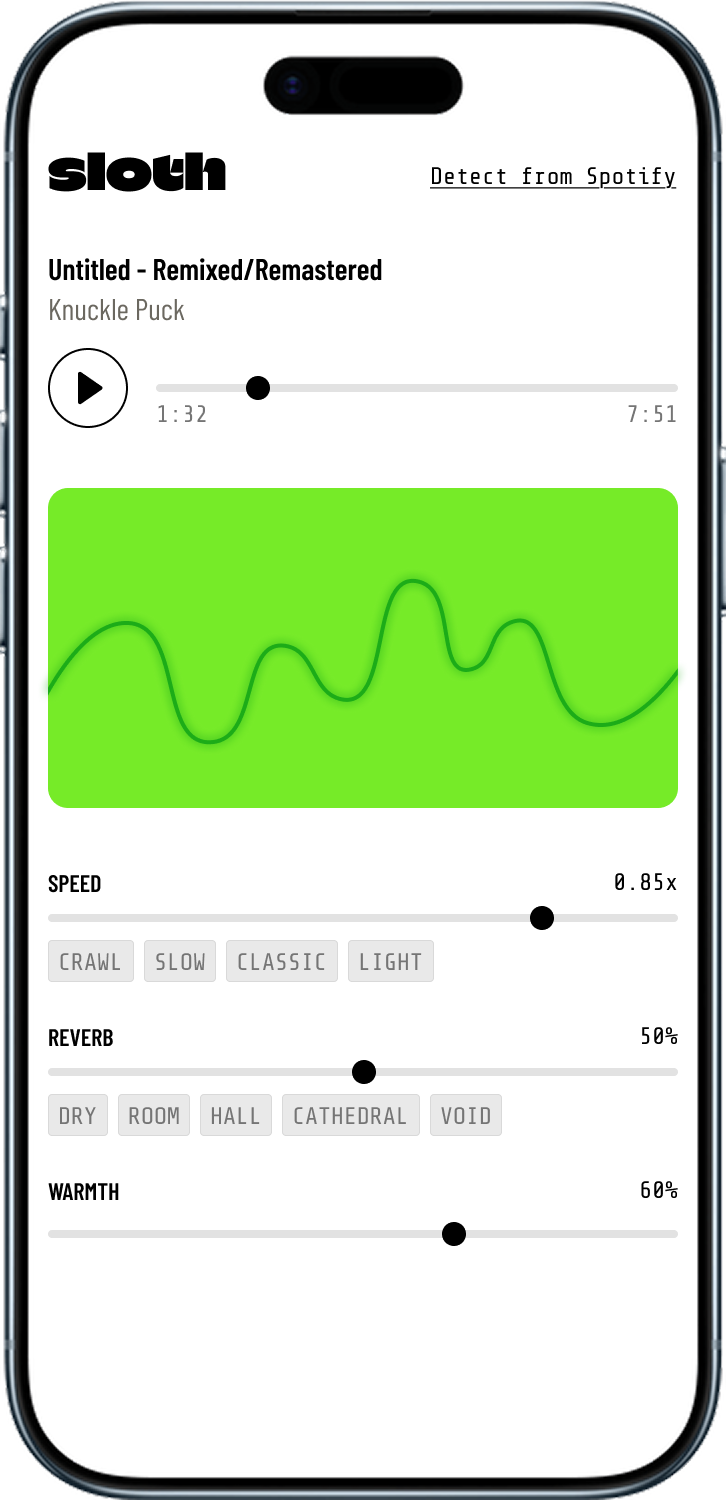
I wanted to use this while listening to Spotify on my phone, not just sitting at my desk loading local files. That meant rethinking the whole thing.
I stripped out the local file upload feature and focused the app around Spotify integration. The speed and reverb presets stayed because they let you quickly try different settings without fiddling with sliders.
The visual redesign happened in Figma. I flipped from dark to light, rebranded from SlowVerb to Sloth, and rebuilt the layout around a dominant green oscilloscope waveform. I'd been looking at synth oscilloscopes for years and wanted something that felt more like hardware. The green waveform became the centerpiece, with everything else organized around it.
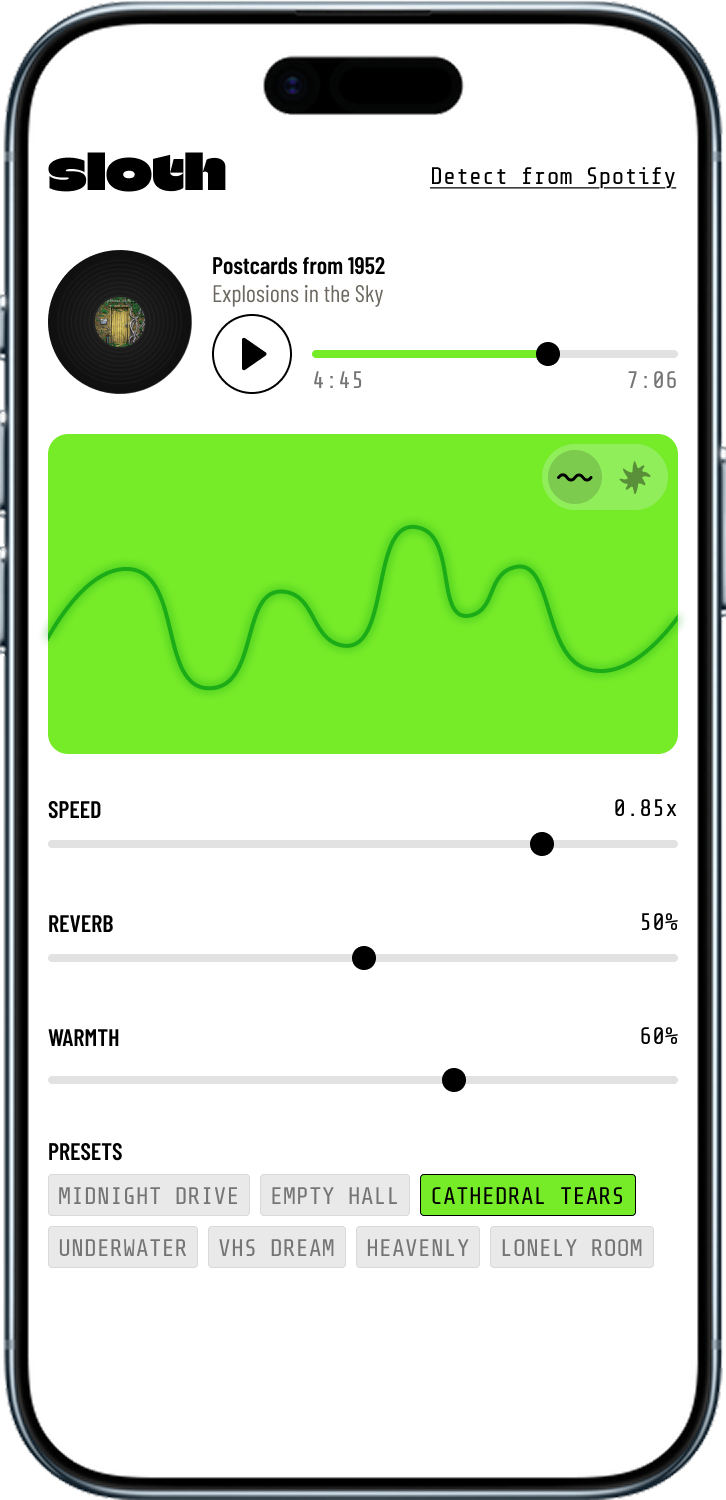
The spinning vinyl record came in. I added a visual mode toggle that switched between the oscilloscope and anime GIFs, a direct nod to those YouTube slow + reverb videos I used to watch. The per-slider chips got replaced with named presets you could tap through.
This was when the app stopped being a technical experiment and became something I actually wanted to show people.
Final
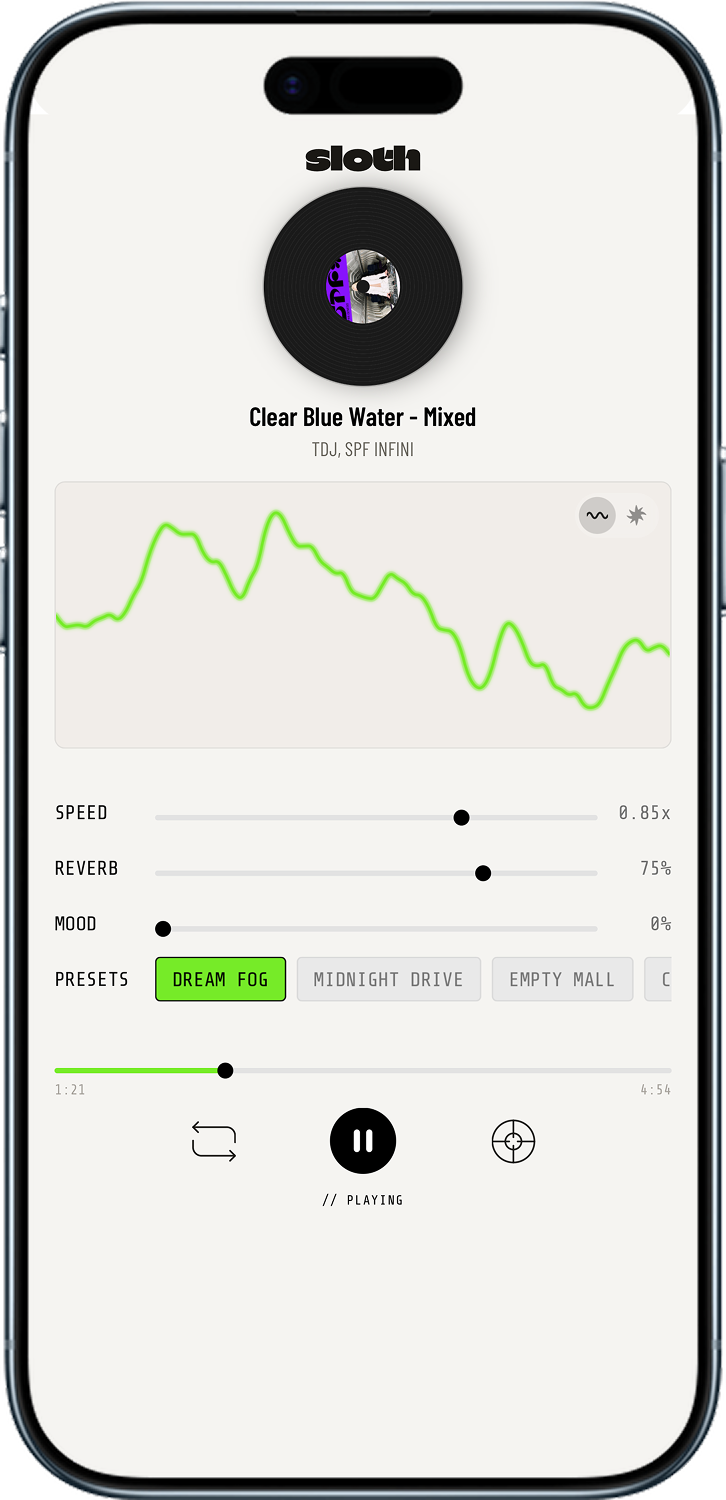
The spinning vinyl at the top, the oscilloscope waveform (or anime GIF mode if you toggle), three sliders for speed, reverb, and mood, and eight named presets. At the bottom is the transport bar with a progress scrubber, repeat button, pause, and a detect shortcut so you can pull in another song without leaving the player.
Key features
Every state the app moves through shows up as a split-flap display at the bottom. Each character scrambles through random glyphs before settling. It's the same animation that runs in the real app. Tap the button to watch the full sequence: FETCHING AUDIO loops until download completes, then cuts straight to PLAYING.
The spinning vinyl is the centerpiece. It rotates in real time, speed-synced to the audio. Pause freezes it in place. Resume picks up from the same angle. The concept is lifted straight from vinyl. You could slow a song by touching the platter. This does the same thing, digitally.
A live waveform reacts to the audio in real time. The oscilloscope look is pulled straight from analog synths, the kind of visual feedback I've loved for years. Toggle to anime mode for looping GIFs, a direct nod to those old YouTube slowed + reverb videos that always had an anime clip playing. Hit ↺ to cycle through 30+ scenes via the Giphy API.
Three sliders control speed, reverb, and warmth. Tap one of eight named presets (Dream Fog, Cathedral Tears, etc.) and all three sliders animate to their target values at once. Drag any slider manually and the active preset deselects, putting you back in full control.
How it works
The whole thing runs locally on your machine. You hit play on something in Spotify, open sloth, tap Detect, and the app reads what's playing via the Spotify API. From there it pulls the audio from YouTube via yt-dlp, caches it locally, and starts streaming it through the Web Audio API where all the DSP happens in real time. After the first fetch, the same song loads instantly.
Play on Spotify
Any device, any song
Detect
Spotify API reads current track via PKCE OAuth
Spotify APISource audio
yt-dlp pulls and caches as MP3 locally
yt-dlpTransform
Speed, pitch, reverb, warmth applied live
Web Audio APIChallenges
This was the first time I built and deployed a full-stack app from scratch. Some of what I ran into was expected. Some wasn't.
Communicating design intent to Claude Code
Feeding Figma prototypes directly into Claude Code got me about 50% of the way. Getting the details right required being extremely specific, almost like writing a design spec than a prompt. Things obvious visually were totally ambiguous in text. I got a lot better at being precise as the project went on.
Cloud hosting hit a wall
I was excited to move off my home server onto Railway. But YouTube actively blocks requests from data center IP ranges. The yt-dlp audio sourcing that makes the whole app work wasn't possible from a cloud server. Had to revert to running it locally. Not ideal, but it pushed me to think about alternate audio sourcing paths down the road.
Wearing both hats at once
Being the designer and co-developer taught me a lot about what developers actually deal with. Building for different screen sizes, why a layout that works in Figma doesn't always translate to code, learning to think about constraints earlier. It made me a more empathetic designer.
Tech stack
I had no prior Python or backend experience going in. I used Claude as a real development partner throughout, not just for the basic setup stuff but for architecture decisions, debugging, and understanding tradeoffs. Everything runs locally by design.
Python backend
Handles Spotify OAuth, audio download routing, local caching, and file serving. Runs on localhost.
Track detection
PKCE OAuth reads the currently playing track without a client secret. No manual input required.
Audio sourcing
Matches detected track to a YouTube source and downloads as MP3, cached for instant repeat playback.
Real-time DSP
All audio processing in the browser: playback rate, pitch correction, convolver reverb, low-pass warmth filtering.
Anime GIF mode
Looping anime GIFs as an alternate visualizer. Searchable by tag, shuffleable with one tap.
Frontend
No framework. Clean HTML, CSS, and JS. Kept it simple so the audio processing could be the complex part.
What's next
I distributed the app to a small group of close friends and family who are also into slowed and reverb music. Getting it in their hands is the next feedback loop. There are also features I've been thinking about that would make it a more complete product.
Save songs
Save a song with the exact slider settings so you can come back to it anytime.
Share with friends
Send a song and settings to someone else who uses sloth.
Chrome extension
Detect any song playing in the browser and open it in sloth without switching apps.
Mac menu bar app
Always accessible from the menu bar. One click to detect, no server setup needed.
Lessons learned
This was the first time I went from an idea all the way to a fully working, deployed full-stack app that I use in my real life. I learned how OAuth flows actually work in practice, how to think about server and client architecture, and what it means to use AI as a genuine development collaborator.
More than the technical stuff, I learned how to be a better communicator between design and engineering. When you're doing both jobs yourself, you can't hand off a vague design and hope for the best. You have to know exactly what you want and say it precisely. That carried over into how I work as a designer.
I built this for myself because I genuinely wanted it to exist. And now it does.